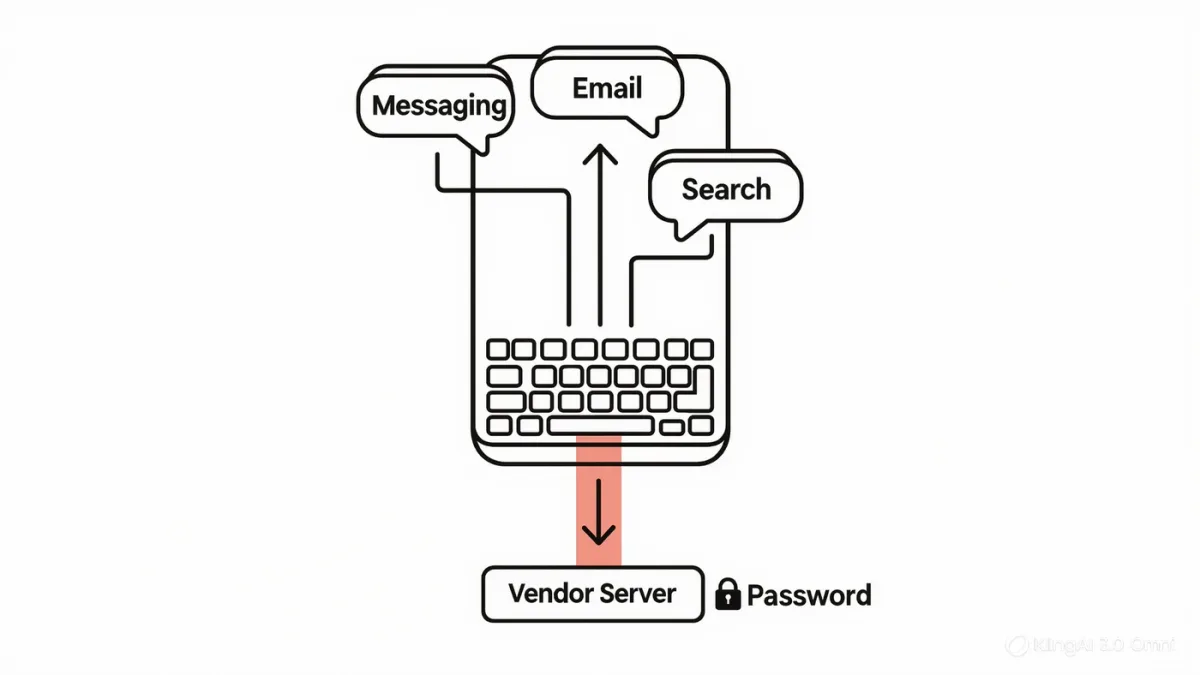
An AI keyboard app replaces your system keyboard to add rewriting, tone adjustment, and translation in every app — and the same architecture that makes it useful makes it one of the highest-trust pieces of software on your phone: a keyboard, per both Apple's and Google's developer documentation, can observe everything typed through it, including passwords unless the system marks a field as sensitive and switches to the secure keyboard. That is the entire trade in one sentence: an assistant in every text field, and a potential logger in every text field. Whether that trade is acceptable depends on the vendor's documented data handling — full stop.
RechargeMe publishes information, not security advice. Details below follow OS developer documentation and app vendors' published privacy policies as of early 2026; policies change, so read the current one before trusting any keyboard with your typing.
What do these apps document that they do?
The category leaders — third-party AI keyboards and the AI features now built into stock keyboards from Apple and Google — describe: rewriting selected text in a chosen tone, grammar cleanup, translation, and generation from a prompt, invoked from the keyboard itself so it works in messaging, email, and social apps alike. The mechanism is consistent: typed or selected text goes to a language model — on the vendor's servers for third-party apps, per their policies, or with on-device processing for the OS-vendor features where their documentation marks it as such. The convenience is real and universal: one interface, every app, no copy-paste.
What is the trust problem, technically?
Operating systems grant keyboards two documented powers: full access to keystrokes typed through them, and — on both major platforms — an optional "full access" permission enabling network connections, required for any cloud-based AI feature. The mitigations are also documented: password fields and secure-entry screens switch to the system keyboard regardless of your default, and platforms require full-access keyboards to declare network use. But between those guarded fields lies everything else — messages, searches, emails, form answers, addresses — flowing through a third party's software and, for cloud features, its servers. The keyboard you choose is a decision about who may read your typing; the OS design makes it so, whatever the app's marketing says.
| Option | Documented data path | Trade |
|---|---|---|
| OS built-in AI keyboard features | On-device where marked; vendor ecosystem terms | Convenience, least new vendor |
| Third-party AI keyboard, no full access | No network — but then no cloud AI | Limited features |
| Third-party AI keyboard, full access | Keystrokes + network to vendor servers | Full features, maximum trust required |
How do you evaluate a keyboard's privacy policy?
Four questions the policy should answer plainly. Does the keyboard log or transmit keystrokes beyond what the AI feature needs? The better policies state that text is processed transiently — sent, used, not stored — and say so in words, not vibes. Is typed data used for training? Consumer-AI defaults vary; the policy's training section, not the marketing page, is the answer. What is retained, for how long, and where? And is there an audit or certification behind any of it? A policy that doesn't address keystroke handling directly — many describe only account data — is answering by omission. The US Federal Trade Commission's enforcement history against apps misrepresenting data practices is the external reason to read policies literally.
What's the practical recommendation pattern?
Documented-behavior tiers, from least to most trust required. First preference for most people: the AI features built into the stock keyboard from Apple or Google — capable, convenient, and covered by the ecosystem's terms, with on-device processing where the platforms document it. Second: a reputable third-party keyboard with a clearly worded transient-processing policy, used with eyes open. And a bright line that predates AI and survives it: financial apps, password fields aside, and anything medical or legal deserve the system keyboard — not because third parties are villains, but because the cost asymmetry favors caution where the downside is uncapped. Configure the default per your risk, not per the app's feature list.
Do you actually need one?
The honest utility audit: tone-rewriting in messaging is the killer feature for people who draft difficult messages on phones; translation-in-place is genuinely excellent for multilingual texting; grammar help everywhere beats switching apps. But most typing is not improved by an intermediary — "ok see you at 7" did not need a model. The category's value concentrates in specific moments, which is an argument for the OS-level features' invocations over a permanent third-party default: assistance when called, silence otherwise, and no new party listening all year for features you use weekly.
FAQ
- Can AI keyboards see my passwords? Secure fields switch to the system keyboard on both major platforms, per OS documentation — but everything typed in ordinary fields passes through the keyboard you chose.
- Do keyboard apps store what I type? It depends on the vendor's policy: better ones document transient processing with no retention; anything unclear should be treated as retention until proven otherwise.
- Are the built-in AI keyboard features safer? Structurally, they avoid adding a new third party, and platforms document on-device processing for some features — safer in trust-surface terms, subject to the ecosystem's own terms.